Scaffolding Possibility: Systems, Stress, and Small Acts of Care

Author’s note: This talk is even better paired with my VALA 2024 talk: The Interdependent Library System. There is a little overlap.
I’d like to share a little of my background, experiences which have shaped the direction of my research and what I’m going to say today. I’ve been at Penn State for seven and a half years now. I work a lot with our Blacklight catalog and the awesome team of developers who actually manage, enhance, and maintain it; I configure our Summon discovery service; and I do a good bit with the data behind it all, whether it’s batch updates or individual troubleshooting. I’m also a quilter, a ham radio operator, a mastodon instance moderator, the partner of a high school teacher, and the caretaker of a small pollinator garden and a surprisingly-small pitbull with surprisingly-big anxiety.
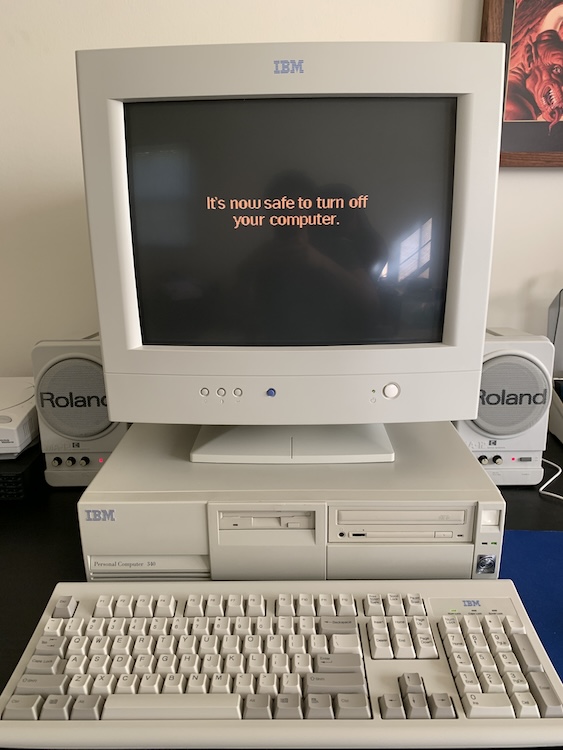
I’m young enough that there’s always been a computer in my house and old enough for that to be a bit unusual. But when I was a child my father wrote software for gas chromatographs and we always had a home office computer where he worked on a pile of floppies and other miscellaneous and mysterious artifacts. One of my earliest memories is pushing the big glowy button on his computer which was sitting on the floor at the perfect height for a crawling child… nobody had a good day. By the time I was in kindergarten, we had a family computer that I was allowed to use. I even learned what operating system I was using–OS/2. My dad gave me buttons that said things like “friends don’t let friends use Windows” and “OS/2 WARP!”
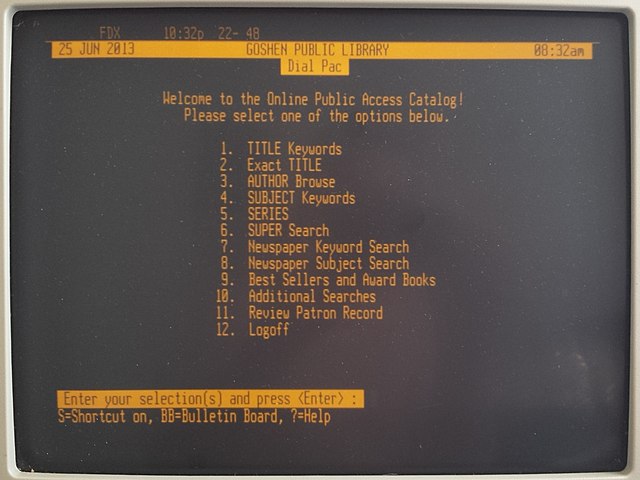
Our local library system computerized in the early 90s and, by the time I was 10, my father had taught me how to use telnet to access its catalog, request books, and review what I had checked out. He also wrote a script that we ran every Tuesday– it logged into the telnet catalog as each member of the family, got a list of what books we had checked out and their due-dates, sorted those books into a single list, ordered the list by due dates, separated out the ones due in the next 7 days, and send the whole thing to the printer. Before we could go to the library after dinner, my sister and I had to find each of those books or renew them, mark it on the printout, and put them in a neat pile for parental review. I didn’t know how the script worked and I didn’t take to initial attempts my father made at teaching me to program, but it developed my sense of possibility, and I think this sense of possibility shaped the person I became.
After some part-time positions in circulation and paging and a student job assisting a cataloger, I started working full time in libraries as a serials specialist at the George Washington University Law Library in my early 20s. Being a law serials specialist in those days meant digging your way out from under piles of journal issues, court reporters, legal updates, and everything else that documents the ever-evolving nature of law. It’s a pretty repetitive kind of job, the sort where you memorize and tap a bunch of keyboard shortcuts and try to limit your mouse movements. In fact, during the over five years I spent in that job I had to get an ergonomic rollermouse to deal with some repetitive strain issues.
During that time, I went to library school at Maryland, but the most influential class I took was one over at Catholic University, on database design. The teacher, Bruce Hulse, was the director of information services at the Washington Research Library Consortium. To me, the most interesting part of the class was learning about how database structures of ILSes had evolved over time and, more importantly, the many challenges in trying to stitch together data from one school’s Millennium system, another’s Aleph, and a third’s Voyager. Despite the disparate data sources, the consortium team pulled together not just a catalog, but circulation and patron account elements necessary for resource sharing.
In my first two professional positions at NASA Goddard and Notre Dame, I worked with our Fedora and Samvera-based institutional repositories. I’d come in thinking that I was going to simply make metadata, but at both places and particularly at Notre Dame I ended up becoming the person who works with developers to figure out how to store, update, display, and reuse our metadata.
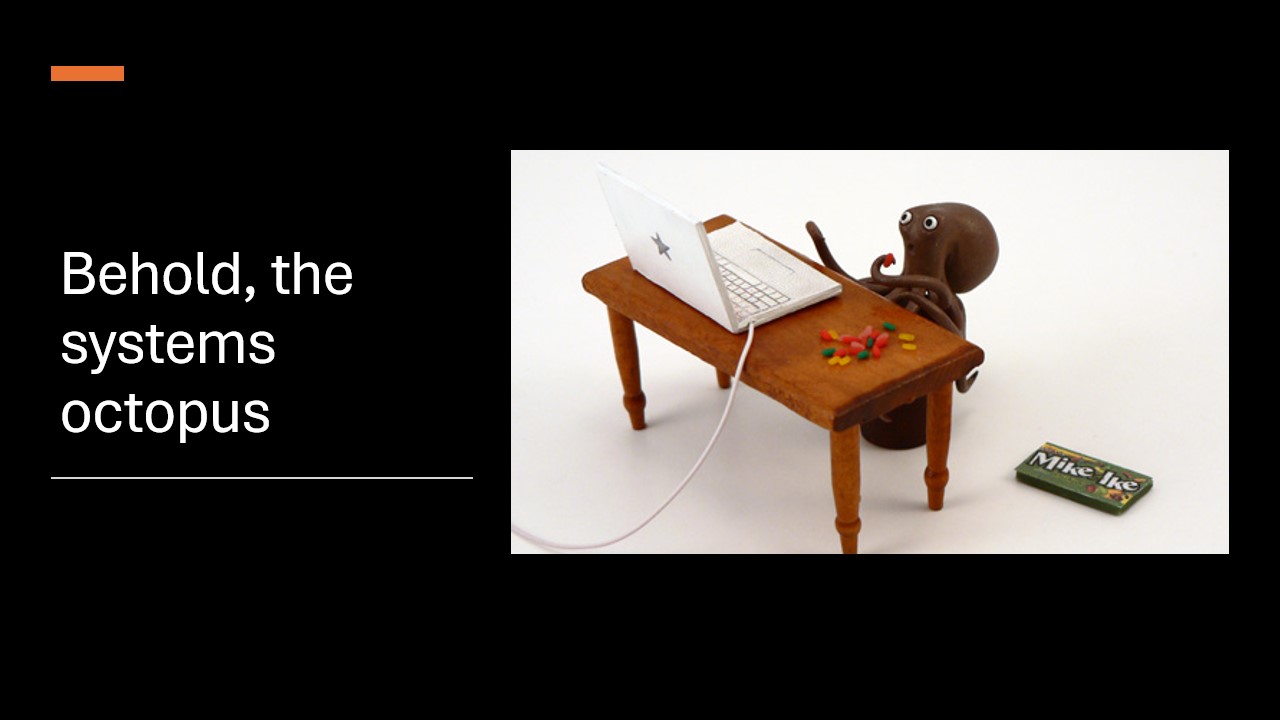
Even though my takeaway from library school and living through a Millennium to Sierra migration at the law library was that I never wanted to be a systems librarian, I’m now part of what I describe as the systems octopus, the many people who make Penn State’s 25-year-old Sirsi Symphony installation work for us.
My Research
So my beginnings set me up to be curious about our systems – how they work, how we can interact with them, what we can do with them and the data they contain – but also about the impact these systems have on people working in them, and where those of us with the most influence in the situation can make things better.
Last year, I conducted a large research project hearing from people about their experiences adapting to new systems post-migration. I asked people not just to rate how well they felt they could work and how they felt about it but to also use free text fields to go into specifics about their experience or even participate in follow-up interviews where we could discuss things in depth. I received hundreds of responses to the survey, 267 of which I considered complete enough to be usable in analysis. I also interviewed a total of 37 people, including some preliminary interviews that helped me shape the broader project.
One of the big motivations for that research is that, if you’ve been in libraries long enough, you probably have picked up a lot of ideas about migrations over the years. But while there was a lot of writing during the initial period of automation about the people who would use these systems, their experiences and reactions, most of what’s been written since then is more in the line of project reports – specific to individual libraries and migrations – sharing lessons learned, technical tips, and project outcomes. Very useful stuff for people like me. The challenges workers faced and how they adapted are sometimes included or can be read between the lines, but it’s not the primary focus and not cross-institutional.
I wanted to know: What can we do better? What, if anything, are our shared understandings about migrations missing? How are people supporting their coworkers and what’s working?
What I’m going to focus on today are the things that I think are most relevant to those of us who play supporting technological roles. Few if any of you are playing a role in designing these underlying systems. Instead, more of us are the people who configure, adapt, support, and reuse them. We’re the ones who extract data and put in tickets and serve as point people for troubleshooting. And I hope it will also be relevant to those of you who work in other kinds of tech and development environments in the library as you think about the people who will use your systems.
Iterating Intro to Library Systems
One of the awesome things about Code4Lib is the breadth of experiences people bring. So I’m not going to presume that you’re very familiar with the integrated library system (ILS) or its modern incarnation, the Library Services Platform (LSP).
Libraries are built on a collection of shared, standardized practices. Most of these are oriented toward organization and control of our materials. I only had to learn cataloging or circulation fundamentals once. Every library has its variations in implementation, but our practices are so similar that my hometown public library, NASA Goddard, and Penn State, three very different kinds of library, all use Sirsi Symphony.
Iterating Integrations
If you go far enough back, these practices were disjointed within each library. If you wanted to tell how often a book had circulated, you’d need to go to the shelf and check the card in the individual item. And if you wanted to figure out whether a particular item was checked out or missing, you might just have to see if it was missed on consecutive shelfreads. You couldn’t just go look it up in the checkout cards because they were organized by the most important piece of data for circulation workers: date due.
So not only did library automation, the process of doing library work with a computer in a shared database environment, make some of this work easier–you could check out an item with a simple scanning action–it brought the possibility of integrating data across areas in the library. You could run a report to get circulation counts vs. hand-tallying them. Our patrons could search the catalog for an item, learn whether it was on the shelf, and go grab it or put it on hold.
As library work continues to evolve, so do the systems that support it. Library technologists develop new tools to support a function, like ILLiad for interlibrary loan or CORAL for electronic resource management. At first they may be used entirely alongside existing systems. But then integrations iterate. Our systems incorporate standardized protocols for exchanging data with these tools and newer generations may even bring them into the system as new modules.
Scaffolding Technologies
Then there are what I call “scaffolding technologies.” This isn’t scaffolding as part of the construction process, but the kind of scaffolding that gets applied to a building after it’s up. Scaffolds aren’t generally pretty, they can be a little rickety, but they’re very functional at providing people with access to places the building isn’t designed to let you access. In the image on my title slide, mural painters were using a scaffold to reach the upper edge of a wall. In libraries, some scaffolding technologies may stay up for the life of a system, but they may also get pulled down once the system itself catches up.
One of the most thorough and specific scaffoldings I can think of is Gary Strawn’s suite of Voyager add-ons. These modules significantly extended Voyager’s functionality for Technical Services workers, especially catalogers. Or there’s MarcEdit, which isn’t particular to any system and is often used to fill in system gaps around working with records in bulk. Most recently, we’ve the Library Data Platform (LDP)/MetaDB project from the FOLIO community which fills a significant reporting and analysis gap in the FOLIO project.
But for every big tool like those, there are hundreds of little scripts – Perl scripts, DLLs, now Python scripts, API calls, or even plugins specific to an institution. They’re a bit like that program my dad wrote to generate a list of all our library checkouts – specific to the tools and contexts in which they were written and very useful for their niche audience.
They might run the transformations necessary to load a vendor’s gnarly MARC records into a system or check whether a particular call number has already been assigned. These do sometimes get shared with others, whether informally through listservs or after user group presentations or more formally through things like Alma’s plugin repository. Sometimes they evolve into their own system. One interviewee told me that when they used Voyager:
We actually accumulated a fairly intensive system which was a user interface over a whole heck of a lot of Perl scripts.
When I was newer to the field, I thought that these scaffolds were always about deficiencies in the system. Some are. I realize now, though, that others act as a translation layer between a generalized system built to support generalized, shared practice and the specific practices and needs of each library’s workers. Whether a system has been in place for 25 years or 25 days, there will always be a need for some local modifications to make it usable for our operational coworkers.
The Operational Library Worker
Let’s take a moment to think about the experience of our operational coworkers. I would guess that most of us in this room are not “operational workers” within these systems. Definitions vary, but one might also think of them as the people who are “operating” the library system in the way a plant worker operates a machine. It generally means bounded tasks – checking in and out items, purchasing materials, editing a catalog record, etc.
Out of curiosity, are there folks here who would currently describe themselves as operational workers? [one person raised their hand]
How many of us have done this kind of work in the past? [many people raised their hands]
I think it’s important to note because an operational experience of a system is fundamentally different from project or developmental work. The closest many of us come to it is in our own tools – Excel, VSCode, git, GitHub, Docker, Kubernates… but we have a bit more freedom to experiment and tinker with our tools.
We can try LibreOffice Calc or Google Sheets instead of Excel if we’re sick of how it handles dates. We can decide that we’re ditching Kubernates for…whatever comes up when we’re frustrated and search for “Kubernates alternatives.” And even if our own transitions aren’t immediate or seamless, an operational worker simply cannot stand up Sierra for themselves or their department just because it supported their particular tasks more smoothly than Alma does.
I haven’t been an operational worker for years, but the serials work I did at GW Law was very much one of those operational roles. I try to maintain my memories of that work as I listen to operational coworkers because that lived experience may be more important than what I “know.” If something is a current design “best practice,” for example, that doesn’t actually matter if the implementation is making the users miserable. And when those users are entirely our own coworkers, as they are with the ILS/LSP, that kind of information is much easier to find than when we’re building tools to be used by patrons.
During my interviews, I had a number of conversations like this with operational workers:
Interviewee: FOLIO requires a lot more clicking than is good to have. I remember one time I was working and I was adding just a copy 2 to a lot of records during a period of a week. So I wasn’t actually bringing in any records, I was just adding a copy 2. And the amount of clicking I had to do made my wrist tired. … In Sierra, you could just hit like enter, enter, enter or Tab, Tab, Tab and you’d be done. But in FOLIO there’s so many little granular things you have to go through it wouldn’t work to just keep hitting tab. You’d be hitting Tab like 100 times.
RKT: Okay.
Interviewee: So you have to go and click and find it on the page and move your mouse all around. And um, it’s a nightmare.
RKT: So that’s not set up well for keyboard shortcuts?
Interviewee: No, not at all. And that’s something that the people in acquisitions have complained about too, because they have to transfer, you know, something from one location to the next location. And they’ve got, you know, 100 books to transfer. And it’s just, yeah, really hard to click all around so, so much.
Or I think of another interview in which a person described how poorly known-item search worked in Alma’s back end. Newer staff expected that searching for a title might involve applying filters or scrolling. Longtime staff like her knew that you used to be able to select a Title index (which was a browse index), type the first few words, and get the record right away. It’s not, she explained, that she can’t use the title keyword search. But “it used to just work.”
It matters because, to quote Annie Dillard, “how we spend our days is how we spend our lives.” Our operational coworkers spend their days doing these tasks repeatedly in the systems they’re given.
So now I’ve set up a system that continually integrates to reflect evolving practices and is often covered in locally-constructed scaffolding to support its operational use. And for those operational roles, the design of a system and its suitability for concrete, repeating tasks can make an enormous difference in how our coworkers spend their days.
Findings from Research
When I set out to research morale and library system migrations, I was particularly interested in how operational workers recovered, or didn’t, after the initial period of shock and change. As I mentioned before, I had 267 complete survey responses with multiple-choice and free-text fields and conducted 37 interviews with folks who wanted to speak in greater depth.
I’m going to walk us on a journey from where data reflects things I think we’ll all find obvious to some new ideas and things I hope that you’ll find useful as you think about your own work. The numbers I’m going to share are drawn from the survey itself, but the interviews enhanced my interpretation alongside the actual content of the free-text fields.
So I’m going to start with the set of people who reported morale changes related to the migration or overall morale stability.
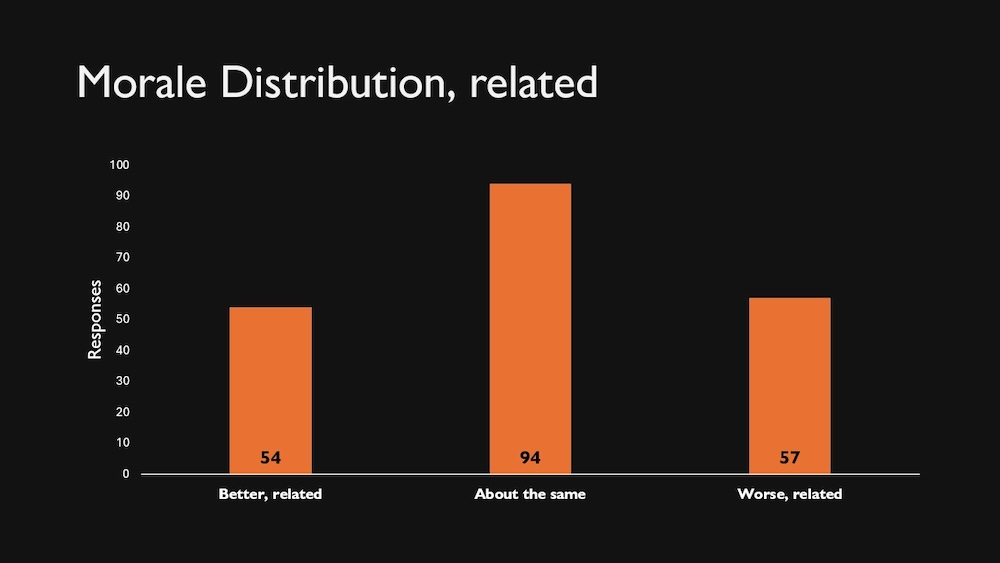
I got this nice distribution: 54 people reported improved morale related to the migration, 94 people reported it had stayed about the same, and 57 people reported worsened morale related to the migration. The rest reported better or worse morale but related to other factors like pandemic, leadership, etc. (with a lovely 26/29 distribution for better/worse, respectively).
Impacts of System Features and Change
As I coded responses in the free-text fields, I created a lot of paired codes. Did the person speak positively about tooling in the new system or did they describe a lack of tooling or functional degradation? The same response might get both codes, of course, like if a person reported that they love having the tools to run Normalization updates on Record Sets but the same system makes it very hard for them to identify unused call numbers.
Better, related (n54):
- Positive System Tooling: 39
- Lack of System Tooling: 12
Worse, related (n57)
- Lack of System Tooling: 32
- Positive System Tooling: 20
So nearly three quarters of the people who reported better morale related to the migration mentioned something good about the tooling. Not surprising. I did find it interesting that only 56% of those with worse, related morale said something negative about the system’s tooling. And 35% of them shared at least one thing they liked. Those numbers are much closer to each other than the 22% of people with better morale who reported issues with the system.
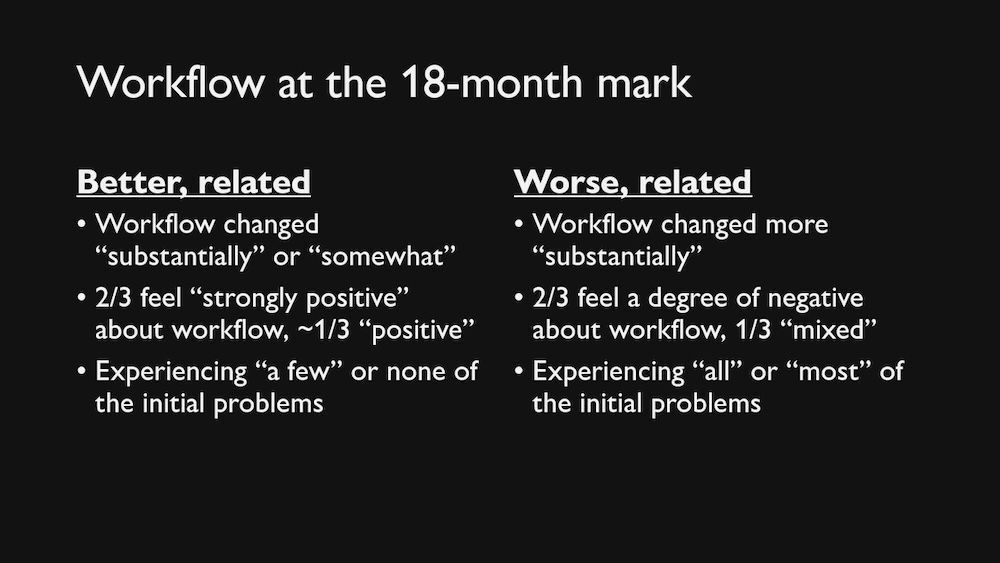
I tried saying the numbers and that didn’t work at all, so I’m going to summarize what’s on this slide. People with better, related morale generally felt strongly positive about changes to their workflow and most or all of the issues they experienced in the first 6 months post migration were resolved by the 18-month mark. Those with worse morale were an almost perfect inverse – feeling strongly negative about changes to their workflows and still experiencing most or all of the issues they’d experienced in those first 6 months.
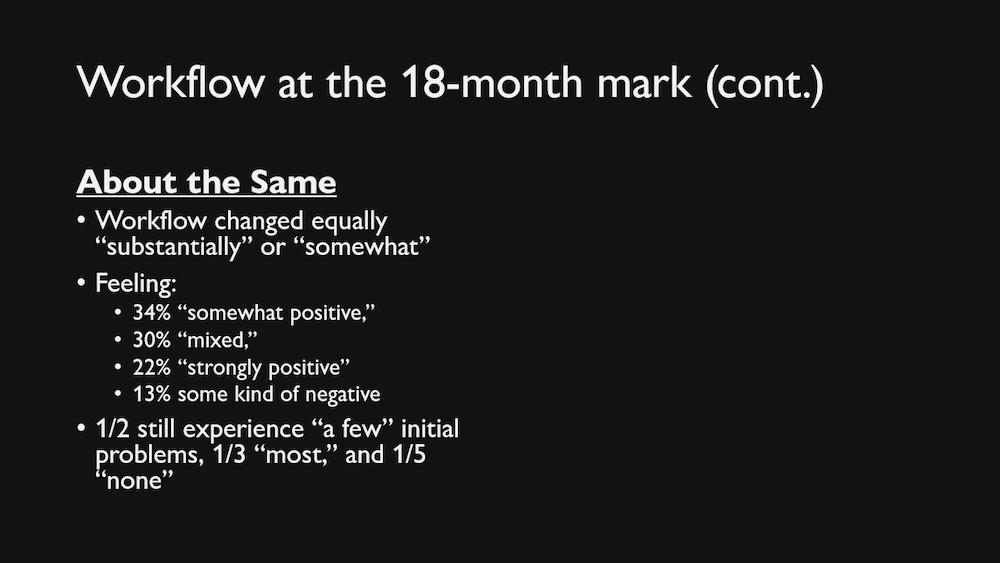
Looking at the people whose morale remained about the same, their work also changed a good bit, they felt overall positive or mixed about it, and while at 18 months about a third still experienced most problems they had at the beginning, only two respondents in that group felt “strongly negative” about it while 17 felt “strongly positive.” Based on free text, these issues seem to have been annoying but not key features. Only 1 of the people experiencing most of the same issues as at launch described concerns that I coded as Disempowerment.
So when we dig into their workflows and the problems they experience, the morale reports are not as surprising. When a system is not working for people and they feel key features continue to be missing or the user experience is worse than a previous system, we can expect that their morale will be worse.
Learning Curves and Interruptions
In the coded data, however, there was one really interesting datapoint that jumped out at me. Everyone reported Learning Curves. So having a learning curve itself isn’t necessarily indicative of where you’ll end up. But what I found interesting was the relative frequency with which people in each group mentioned it. These are the top coded factors by group with the system tooling codes removed:
Better, related (54):
- Learning Curve: 30
- Empowerment: 14
- Data Migration Issues: 12
- Browser (positive): 9
Same (n94):
- Learning Curve: 28
- Data Migration Issues: 21
- Lack of Management Support: 15
- Disempowerment: 11
Worse, related (n57)
- Disempowerment: 23
- Browser Issues: 19
- Lack of Management Support: 18
- Learning Curve: 15
People with better morale or similar morale were much more likely to mention learning curves than those with worsened morale were. In addition to their negative and positive thoughts about system tooling, those with worsened morale brought up disempowerment, specific browser issues, and a lack of management support more often than they did a learning curve. To put it in full context, it falls sixth in most frequently mentioned subjects, just ahead of data migration issues:
Worse, related (n57)
- Lack of System Tooling: 32
- Disempowerment: 23
- Positive System Tooling: 20
- Browser Issues: 19
- Lack of Management Support: 18
- Learning Curve: 15
- Data Migration Issues: 13
From reading the text of these surveys and from interviews, I believe this is a question of resolution and the things that get in the way of resolution. It’s not that the person hasn’t learned how to function in the system, but they don’t see it as a thing that they’ve resolved in a way that they can describe as a “learning curve.” “I started here, I am now here, there was a learning curve in between.”
Instead, people have learned to function in a system, but that functioning is shaped by disempowerment (by the system itself or local changes), by recurring browser issues when actually using the system, and/or by a lack of support from managers and administrators. They may have started by thinking about it as a learning curve, but if so, they’ve abandoned that model. They will learn how to use the system, despite whatever’s thrown at them, but they will learn that many of their major tasks are harder than in the previous system, they will learn that it takes more time to complete an operation because of page load times, they will learn that, as one person told me, “I cannot do it in fewer than 8 clicks, I’ve tried,” and they will carry all that.
What Can We Do?
So, what can we, the broad swath of people who come to Code4Lib, do? In the cases we are given the chance to build such systems, it is absolutely vital to account for the kind of operational use it’ll get. Not just how easily a task can be done once but how well it repeats 5 or 50 times in short order. Not just whether a task can be performed but whether there’s been a significant degradation in functionality from previous systems.
But – to get the pessimism out up front here – these systems are dominated by a few vendors and we don’t control them even when we collaborate with them. There will be some people whom we can’t help because the only fix would be a completely new UI that accounts better for the tasks they do. Those experiences need to be seen alongside the many positive things we can do to support our colleagues.
Because there are a lot of things we can do. Throughout the surveys and interviews, I heard about all the interventions by coworkers and community that picked people up after their morale had plummeted. These respondents might not make it all the way over into “I love the new system” but they felt more comfortable. Some still hated the system but didn’t feel entirely powerless in it anymore.
The story wasn’t “I started here, I am now up here, there was a learning curve in between” but it also wasn’t “I’ve figured out how to use it as best I can but I’m totally miserable.” It was more “I ran into all these problems but here are a few things my coworker did that made things less awful.” Part of their journey was smoother, even if the shape of the path isn’t a learning curve.
A lot of what I coded as “Lack of Management Support” was an implied or stated message from administration and/or middle management that “it is what it is, learn to live with it” or the assumption that struggles to adapt were the worker’s fault, not problems in the system. And it’s very reasonable for people to become discouraged and demoralized when things aren’t working well and they have no reason to believe that they’ll improve. So when we make even a few things easier or find a way to change a person’s experience in the system, we foster a sense of possibility, a sense that this isn’t how it’ll always have to be.
Scaffolding as Possibility
Even addressing one small but annoying task can make an enormous difference. For example, two catalogers, using Alma and FOLIO, told me about small local workarounds that people at their libraries had come up with to make it easier or even possible to check whether a call number was in use before assigning it. For them, this was the difference between being able to catalog a book and send it to the shelf and having a stack of unfinished books on their desk because they don’t know where to tell people to put them.
Someone who still found FOLIO very frustrating overall told me that:
“[LDP] saved our butts.”
For them, it meant they could competently assess their collection – meeting internal and external needs – and gave them some sense of empowerment in an otherwise-disempowering situation.
Attention to Experience as Possibility
Fostering a sense of possibility doesn’t require you to be a tech genius, just someone who continues to pay attention to the challenges your coworkers experience and doesn’t write them off as “the way things are.” For example, the administration at the library where LDP saved their butts:
“listened to us and we said, this is a problem. We can’t do this. This is missing.”
The workers identified which tasks they couldn’t do and LDP as a tool which could fill in the gaps. Not only did the administrators acquire LDP for the library, they also paid for skill-building so that their workers could learn how to query in this new system.
At a smaller scale, it could look like taking on the challenge of documenting issues for your department – recording what kinds of problems coworkers are having, writing and chasing tickets, and communicating about it inside and outside the library. You can use your comparative comfort and literacy with technology to advocate for someone who can’t be more specific about it than that they are struggling.
One of the many people who told me about this kind of coworker said that their systems librarian continued to maintain a list of reported problems years after the migration. They would check in with this interviewee about whether an update had fixed an issue or bring back a solution they’d learned from someone else.
Even as the interviewee continued to experience frustrations in the new system, they knew that they weren’t forgotten and there continued to be a possibility that things would be fixed. This, in turn, meant that they actually reported issues that they were experiencing (a challenge I discussed after interviewing system maintainers), which gave the systems person a chance to actually solve them.
Solving Problems Together as Possibility
Those relationships also develop and maintain a sense of possibility, even when the answer isn’t “yes, we can fix this” every time. Another role that we can play is ensuring that others are included in work on the solution, at least if they want to be. This may mean suggesting that they take a role in a local, consortial, or external user group related to the problem and being available as someone they can check in with if this is their first time in such a position.
One conversation that particularly stuck with me on the positive impact that collaboration and working toward the possibility of something better can have… after describing the things that they and others in their consortia still couldn’t do in FOLIO, an interviewee observed:
It’s ironic, like you’d think that all the extra workarounds and the fact that we still don’t have workarounds for some things would lead to low morale. But I really love how we work together on it.
That person, who held the kind of staff position that rarely gets sent to conferences, found it empowering to be a member of the FOLIO SIG for their area of work. “I’m part of a wider group of people,” they said, naming institutions and countries from which other special interest group members came. “I’ve definitely gotten a lot of skills I wouldn’t have otherwise.”
Another interviewee I asked about their experiences on a consortial committee reflected:
Even though we sometimes complain about the system, we also have really bonded a lot. … The complexity of Alma requires a lot more collaboration and cooperation, among different departments and among people in similar roles at different consortial institutions.
Even after the migration concluded, they appreciated ongoing relationships with these coworkers, solving whatever problems came up.
Conclusion
There are many reasons people get stuck in a place where they feel like things won’t get better. And there are just as many ways we can open up possibilities for each other, just like my father’s scripts opened up a whole new world of possibilities to me as a child.
So embrace possibility and share it where you can.
If you’re not someone who can write a system, write or reuse a script. It doesn’t have to be elegant if it works.
If you can’t write a script but feel an above-average comfort with technology, be that translator for someone who doesn’t. Help them present their problems in a way that gets an answer.
If you see a way that the person you’re supporting might get involved in improving the tool, suggest it. Then be there alongside them while they adjust to a new way of working.
This work is rarely a matter of grand gestures or new tools, but instead a hundred tiny acts, stacking up over months and years, making workdays better in small ways for our community.
How we spend our days is, after all, how we spend our lives.
Epilogue
And as I was writing this conclusion, I felt echoes to our current moment, or perhaps the current moment reflected into the entirety of the talk.
Because we’re not the people building the library services platform, unless we are.
And we’re not the people running the country, unless we are.
But we are the people building small parts of the environment in which those around us live every day. If we’re not building systems, can we build scaffolds to get people to the things they need to live and thrive? Whether it’s just in a place designers didn’t expect them to go or somewhere they were actively shut out of?
We may not make something as useful as a MarcEdit or an LDP, but maybe, maybe, we can work together on the mutual aid equivalent of some Perl scripts of care. What if we took small steps where we could, so those, as an interviewee told me, we don’t let anyone slip through the cracks.
Thank you.
Image attributions
- Title slide: WPA Power mural being created by Eric Mose
- IBM 340 PC: https://commons.wikimedia.org/wiki/File:IBM_Personal_Computer_340.jpg
- Dynix Telnet display: https://commons.wikimedia.org/wiki/File:Dynix-Main-Menu-via-Telnet.jpg
- Systems octopus: https://flickr.com/photos/articulatematter/4405416138


